
A migration is a process, not a button.
Dr. Cherrie Gonzalez’s move to ClinicOS took hands-on setup, careful file preparation, and a preview that made the exceptions clear.
Follow the migrationA real account
of the work behind the move
ClinicOS is a Philippine clinic management and cloud EMR platform developed by Automated Client System (ACS International Agency OPC). This is how one clinic’s migration unfolded—with the review steps, the numbers, and the parts that took time.
THE PROCESS, IN FOUR PARTS
From first setup
to confirmed import.
Not every file is ready on the first pass. Here, progress meant making each next step visible and reviewable.
A person to start with
First, Daphne helped get the clinic set up.
Daphne, an ACS Healthcare Implementation Coordinator, helped Dr. Cherrie Gonzalez create and set up the clinic’s ClinicOS account. Once the workspace was ready, the ClinicOS Operator took responsibility for the concierge migration.
Work through the export
The first export wasn’t a clean fit.
The previous EMR’s export did not line up neatly with the import format. The team worked through trial and error over several days, checking the file and refining it until the final import was ready.
Progress saved at 11,000 of 15,000 rows uploaded.Review before importing
A preview made the exceptions visible.
Before importing, the preview separated rows that were ready from records that needed attention. Unmatched and ambiguous rows were flagged for review rather than silently attached to a patient record.
Preview: 13,905 ready / matched · 1,073 unmatched · 22 ambiguous.Confirm the import
The history showed what completed.
After the review and confirmation, import history showed 13,905 records imported successfully. The other rows were not represented as imported: unmatched and ambiguous entries remained exceptions to review.
Import history: 13,905 imported successfully.A CLEAR VIEW OF THE WORK
Progress, then a reviewable preview.
The screenshots show selected moments in the migration. Exceptions stayed visible for review; only the successful total is described as imported.
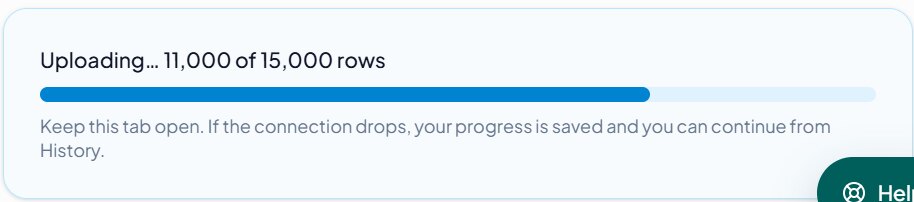
While the file was being prepared, the upload could be continued from its saved progress.
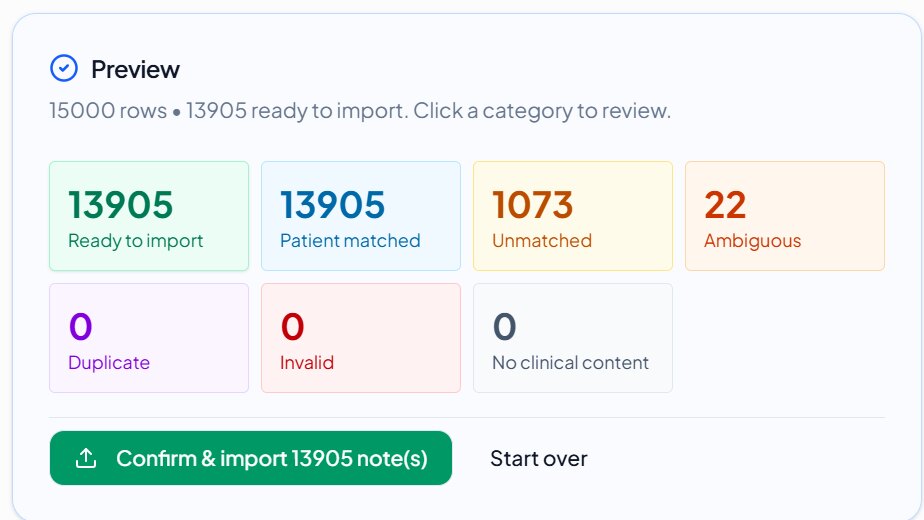
13,905 rows were ready and matched. The 1,073 unmatched and 22 ambiguous entries were called out for review.

After confirmation, import history recorded 13,905 imported successfully—not all 15,000 rows.
WHAT MATTERED AFTER THE MOVE
For Dr. Gonzalez, the upgrade was in the day-to-day notes.
Dr. Gonzalez described ClinicOS as an upgrade from her previous EMR. She specifically valued AI SOAP Notes and the Summarized Report tab, which made clinical note-taking feel seamless and more flexible.
ClinicOS is a complete integrated clinic system. Moreover, the customer support by the administrator is very personalized. And this is what I appreciated most.
ROOM TO KEEP IMPROVING
Feedback is part of the story, too.
Dr. Gonzalez also shared an idea for improvement: a more expanded SOAP Notes view. It is feedback from her experience, not a feature commitment.
YOUR CLINIC, YOUR TRANSITION
Talk through what a move could involve.
Bring your questions about setup, file preparation, and import review. We’ll start with your clinic’s workflow.